
Retypit vs PhoText — Same Poster, Stylized Lettering
We ran the same edit on one vintage poster: change the headline MAGICIAN to ILLUSIONIST. The source image is the official original used on the Retypit homepage. PhoText was retested on 14 November 2026 at photext.ai, as a guest, with its advertised click-and-type Manual edit. The Retypit result is the published homepage after for this same poster and edit (labeled on the homepage as tested in October 2026).
| Axis | Winner | Why |
|---|---|---|
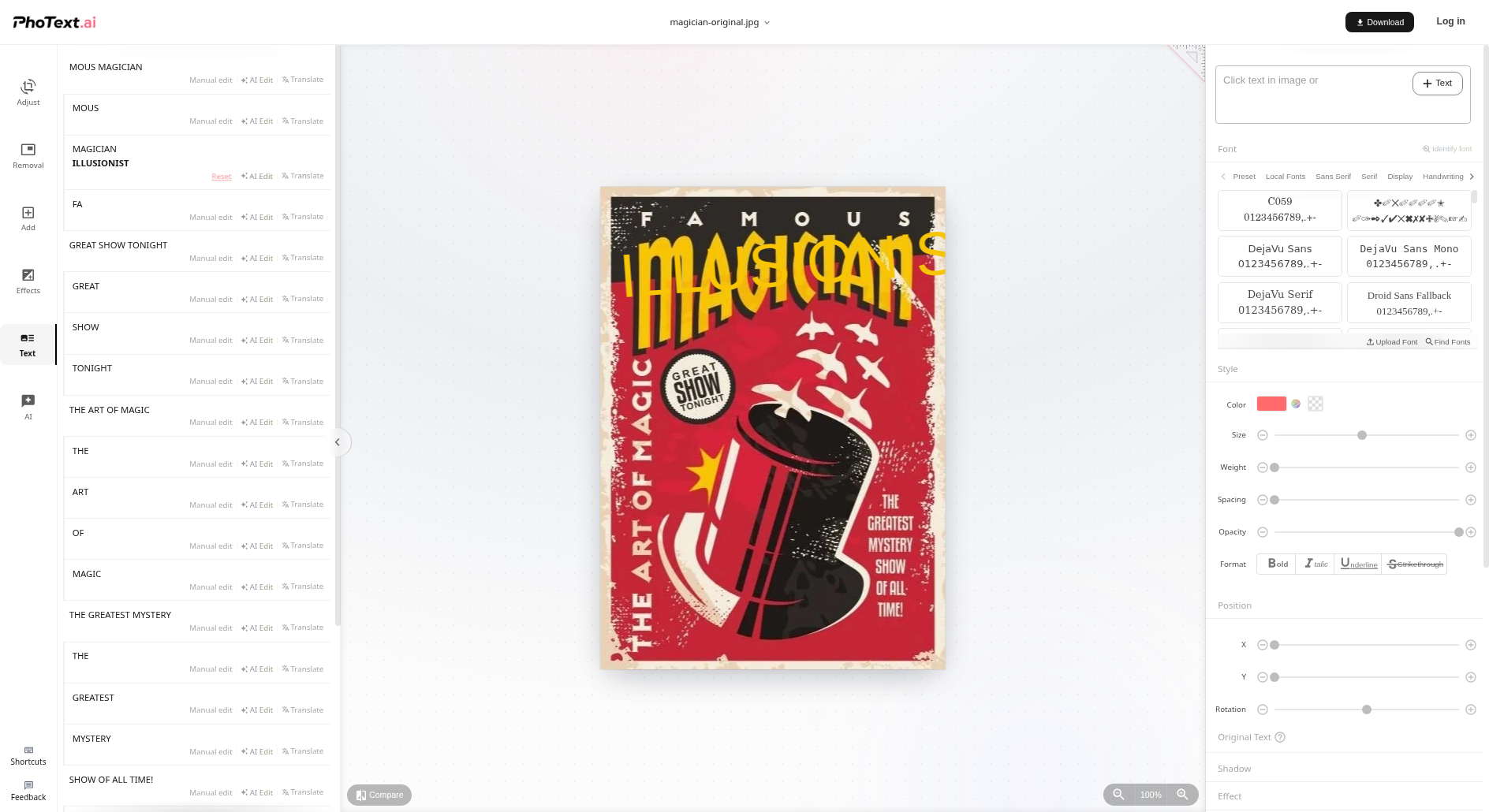
| Edit accuracy (stylized lettering) | Retypit | Retypit rebuilds ILLUSIONIST in the same condensed yellow display style, with the original shadow and worn texture, and leaves the rest of the poster untouched. PhoText’s manual editor leaves MAGICIAN in place and pastes a flatter yellow ILLUSIONIST on top of it, overflowing the right edge. |
| Workflow | Split | PhoText lets a guest click, type, and preview immediately, but Download and conversational AI Send require sign-in. Retypit requires sign-in to edit. Check current pricing for what a text edit costs. The download is the finished image, with no watermark. |
| Recognition | Retypit slightly cleaner on this poster | PhoText did isolate the MAGICIAN line, but its layer list was noisy (MOUS MAGICIAN, FA split from FAMOUS, and repeated fragments). |
How we tested
- Same source image: the official original at https://retypit.ai/compare/photext-original.webp (437×612), the vintage “FAMOUS MAGICIAN” poster used on the Retypit homepage compare.
- Same edit on both tools: MAGICIAN → ILLUSIONIST. Nothing else was meant to change.
- PhoText: https://photext.ai/ on 14 November 2026 (Asia/Shanghai), guest session, Manual edit (click the line and type). Accepted formats shown on the landing page were JPG, PNG, JPEG, WEBP, and PDF.
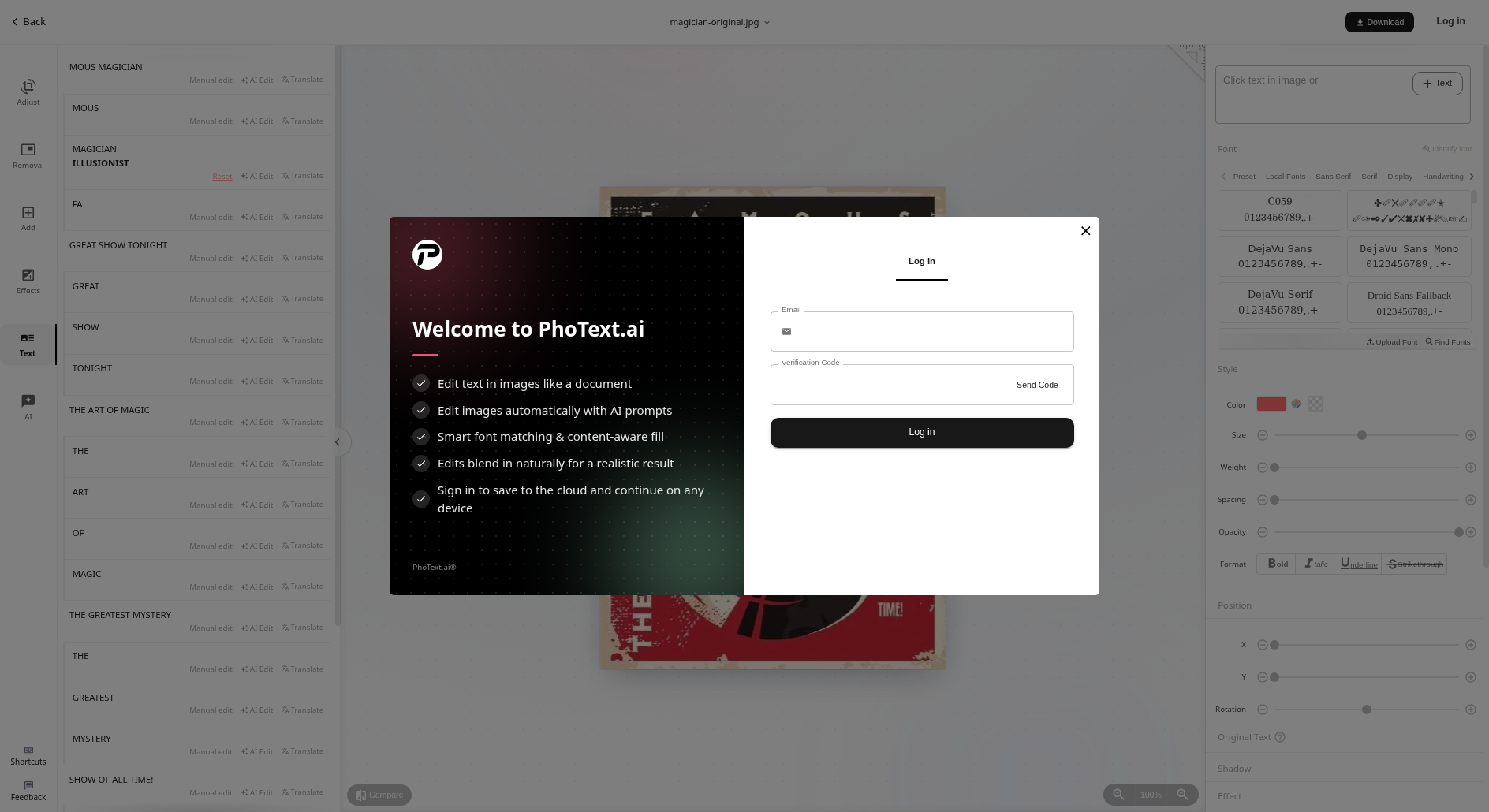
- The PhoText result on this page is a canvas capture, not an official download. Clicking Download opened a “Welcome to PhoText.ai” login modal (email and verification code). We did not sign in, create an account, or pay, so there is no exported file from this run.
- Conversational AI Send hit the same login modal. A guest “AI Edit → Generate” on the MAGICIAN layer reloaded the editor and returned the original poster, with no completed AI result. This page does not rate PhoText’s AI mode.
- Retypit after: the published homepage result at https://retypit.ai/compare/photext-retypit.webp, same poster and same edit, labeled on the homepage as tested in October 2026. We did not re-run Retypit on 14 November 2026 for this write-up.
- We did not see dollar prices, credit packs, or numeric quota caps on PhoText’s public pages or on the login modal. The landing page says basic features are free, with a free trial quota for advanced features. We are not stating a PhoText price.


Edit accuracy — Retypit rebuilds the word; PhoText pastes an overlay
Most image text editors are usable on plain, flat type. The hard case is stylized display lettering: condensed forms, fill, shadow, and worn texture that already belong to the picture.
On this poster, Retypit regenerated ILLUSIONIST in the same condensed yellow display style as MAGICIAN, kept the shadow and worn texture, and left FAMOUS, the hat, the doves, and the side and lower lines untouched.
PhoText’s manual editor did not replace the original letters. After we typed ILLUSIONIST, MAGICIAN was still fully visible in the original style. A flatter, thinner yellow ILLUSIONIST sat on top of it, like a text layer pasted onto the poster, and the trailing S ran off the right edge. The font panel offered generic fonts (for example C059 and DejaVu Sans), not a rebuild of the poster’s display lettering.
That is the difference this test is about: changing the words that are already in the picture, versus putting new type on top.



Workflow
Retypit
Upload a JPG, PNG, or WebP (up to 20MB) on retypit.ai. Retypit detects the lines, you click the ones to change, retype them, and press Run. Sign-in is required to edit. Check current pricing for what a text edit costs. Download the edited image with no watermark.
PhoText
The landing page invites you to click the text and type, with no design skills needed. In our guest session, upload started without an account. After a first upload hung, a second attempt opened the editor, isolated MAGICIAN, and let us type ILLUSIONIST with an immediate canvas preview.
Download did not save a file. It opened a login modal: “Sign in to save to the cloud and continue on any device,” with email and a verification code. Conversational AI Send used the same gate. Manual editing and preview were possible as a guest; taking the file and sending an AI prompt were not.
Recognition
PhoText did detect MAGICIAN as its own line, which was enough to start the manual edit. The rest of the list was messy on this poster: FAMOUS appeared as FA and as part of MOUS MAGICIAN, and several lines were split or repeated (GREAT / SHOW / TONIGHT alongside GREAT SHOW TONIGHT, and similar fragments under THE ART OF MAGIC).
This did not block the headline edit, but it made the list harder to trust if you needed to change other lines without cleaning the text first.
When to pick which
| Tool | Good fit when… |
|---|---|
| Retypit | You need the new words to keep the original display style, shadow, and texture, so the line still looks like part of the picture. |
| PhoText | You want a guest click-and-type preview. On this stylized poster, that path pasted a flat overlay on top of the original letters and overflowed the edge. You still need to sign in to download. We did not complete an AI edit in this guest session, so we are not comparing AI quality here. |
Bottom line on this poster: Retypit wins on stylized lettering. PhoText’s manual path behaved like adding a text sticker, not like rebuilding the word that was already there.
Try Retypit
Change the words already in a picture and keep the same font, color, and style. Upload a poster, screenshot, or photo on the homepage and retype the line.
Edit text in an imageAlso useful: How to change text in an image · Retypit vs ReWords